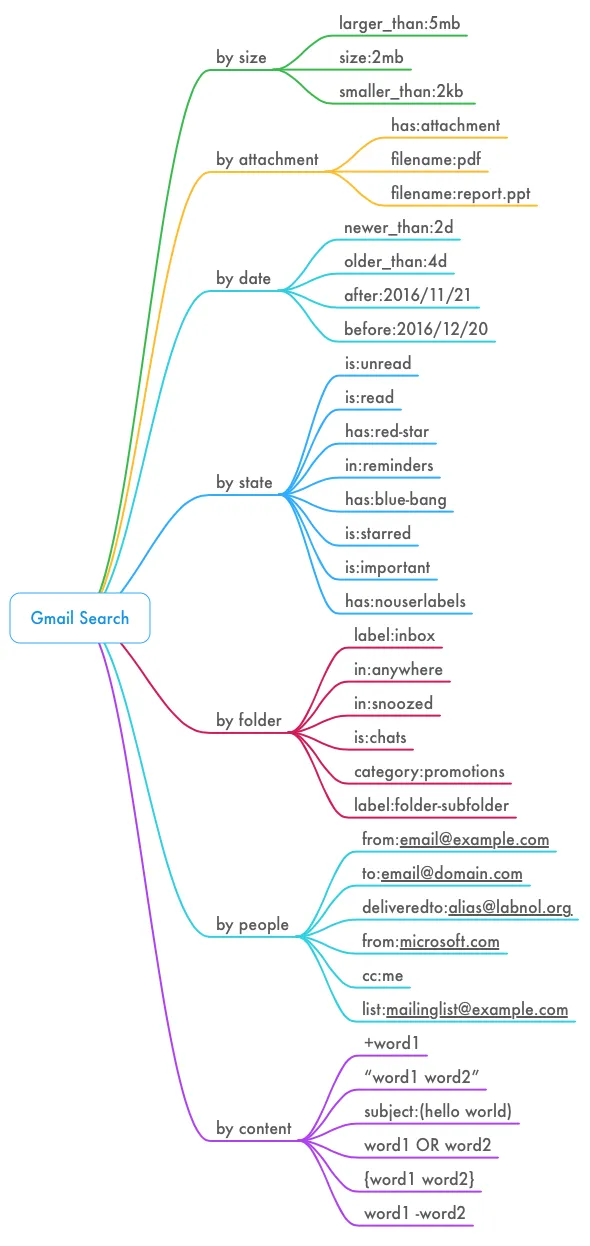
Gmail supports a plethora of search operators to help you instantly find that elusive email message buried in your mailbox. You have size search – like larger_than:5mb – to find the big messages in your account. File search – like has:attachment filename:doc – will locate email messages that contain specific file attachments. This graphic illustrates all the known Gmail search operators that work both on Gmail website and mobile.
Search by Date in Gmail
Date search in Gmail helps you locate emails sent or received during a specific period. Here are some examples:
newer_than:7d from:me– Emails sent in the last 7 daysafter:2020/10/15 before:2020/10/20 from:uber– Emails from Uber received between October 15 and October 20.newer_than:60d older_than:30d– All emails received in the previous 30-day range.
The date in the Gmail search query is specified in the YYYY/MM/DD format.
Search Emails by Specific Time in Gmail
Gmail supports an undocumented time-based search option that lets you find emails sent or received during a specific hour, minute or event second. For instance, you can limit your Gmail search to emails that were received between October 10 8
PM and October 10, 2020 8 PM.
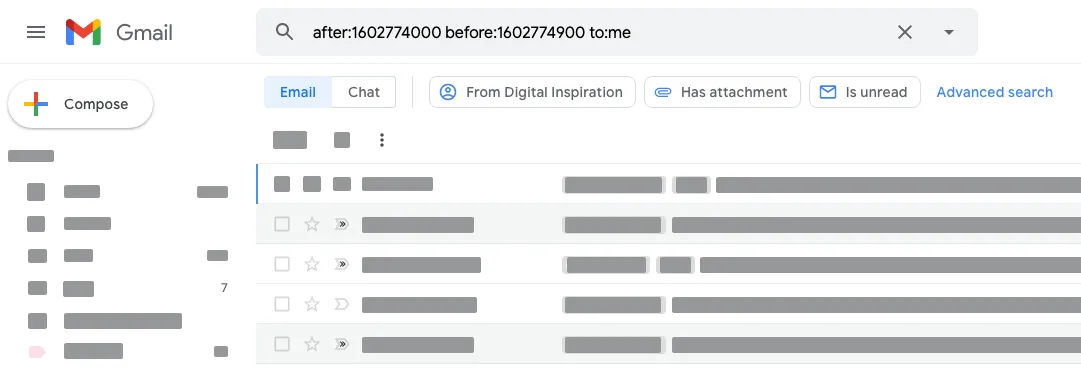
To get started, convert the date and time to Epoch time and then use the timestamp with the standard after or before search operator of Gmail.
For instance, the Epoch time for October 10 8
PM is 1602774000 and that of October 10 8 PM is 1602774900. Use the search query after:1602774000 before:1602774900 to:me in Gmail and you’ll get a list of all emails that were received during that 15-minute period.
Epoch time is the number of seconds that have elapsed since January 1, 1970 (UTC). Use the Epoch converter to represent a human readable date and time in Epoch and use that timestamp with the before or after search operator of Gmail to find that elusive email.
Date and Time Search with Google Script
Here’s a little snippet that will automate your Gmail search by time using the Gmail API. It will fetch all email messages that were received between 12
PM and 1 PM.
const emailReceived = () => {
  const secondsSinceEpoch = date => Math.floor(date.getTime() / 1000);
  const after = new Date();
  const before = new Date();
  after.setHours(12, 15, 0, 0);
  before.setHours(13, 30, 0, 0);
  const query = `after:${secondsSinceEpoch(after)} before:${secondsSinceEpoch(before)}`;
  const messages = Gmail.Users.Messages.list("me", {
    q: query,
  });
  Logger.log(messages);
};
Also see: Mail Merge for Gmail
Author

prakhar@affmantra.com
Related Posts

How to Create Photo Stickers in Canva
Table of Contents This quick tutorial will walk you through the steps to create your own custom stickers from photos in Canva....
Read out all
How to Add Speech Recognition to your Website
Table of Contents 1. Add Voice Recognition to your Website Open the Google website on your desktop computer and you’ll find a...
Read out all
How to Handle OAuth Permissions in Google Add-ons
- 0
- 714 words
Table of Contents 1. How to Check for Required OAuth Scopes 1.1 The “Authorization Catch-22” Problem 1.2 How to Reset the Permissions...
Read out all
How to Recover Permanently Deleted Files and Folders in Google Drive
- 0
- 326 words
Table of Contents When you delete any file or folder in your Google Drive, it is moved to the trash folder. The...
Read out all
Simple URL Tricks for Google Drive You Should Know
- 0
- 374 words
Table of Contents 1. Google Drive URL Tricks 1.1 Google Drive Web Viewer 1.2 Reader Mode for Google Drive Files 1.3 Embed...
Read out all
How to Extract URLs from HYPERLINK Function in Google Sheets
- 0
- 201 words
The HYPERLINK formula of Google Sheets lets you insert hyperlinks into your spreadsheets. The function takes two arguments: The full URL of...
Read out all