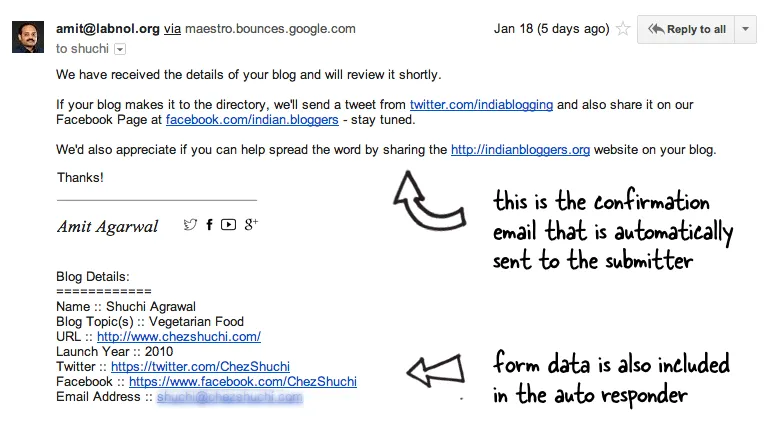
You have a Google Form and you would like to send an auto-confirmation emails to the person as soon as they submit the form. The autoresponder email message can contain a custom note (like an acknowledgement saying that you have received their form entry) and also a copy of the form answers that that they have submitted.
These auto-responders are similar to canned responses in Gmail but for Google Forms. You may use the technique for sending welcome messages, acknowledge support requests, and more. Here’s a sample confirmation email that was sent through Google Forms:
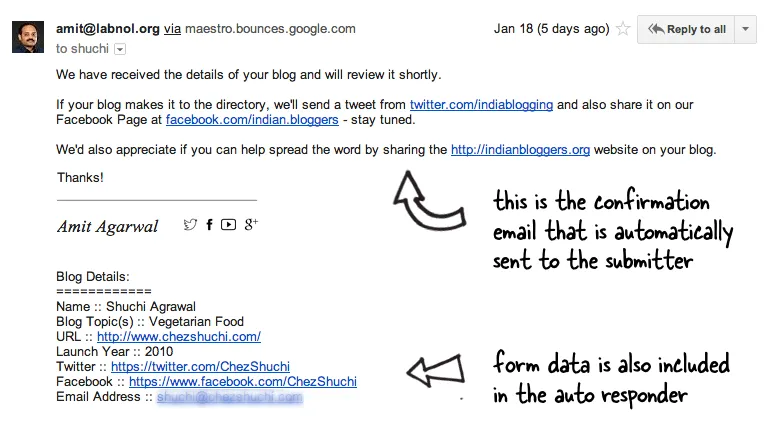 A sample auto confirmation email sent through Google Forms
Send a Confirmation Email to the Form Submitter
The other day I got an email from N.Vamsi asking me how to send these confirmation emails using Google Forms?
Would you mind telling me how you have set up auto email updater for inputs taken from Google forms. I have seen your video tutorial on setting up Google forms and getting input values to an email address but auto email responder is something new! Do you have any tutorials for that as well?
This is easy and you can can add the auto-reply feature to your Google Forms in less than a minute. Here are the steps involved:
- Create a new Google Form with one or more fields. You can also use an existing form but do make sure you have a field where you would be asking for the email address of the form respondent. This should be a mandatory field.
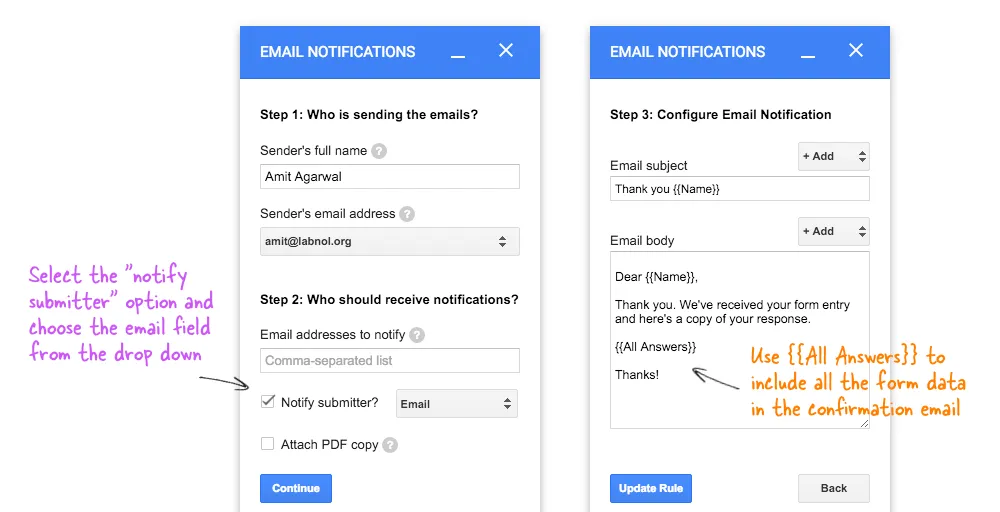
- Install the Google Forms add-on, then go to the add-ons menu inside forms, choose Email Notification for Forms and select Create New Rule.
- Enter your name, choose your Gmail alias that you wish to use for sending confirmation emails and check the “Notify Form Submitter” option. Select the form field that you are using to get the email address of the respondent.
- On the next screen, customize the email subject and message as described in the Google Form Email tutorial.
Create the rule and you’re done. When anyone submits the Google Form, they’ll get an automatic confirmation email in HTML format and copy of the email data will also be cc’ed to you so you are in the loop.
Author

prakhar@affmantra.com
Related Posts

How to Add Speech Recognition to your Website
Table of Contents 1. Add Voice Recognition to your Website Open the Google website on your desktop computer and you’ll find a...
Read out all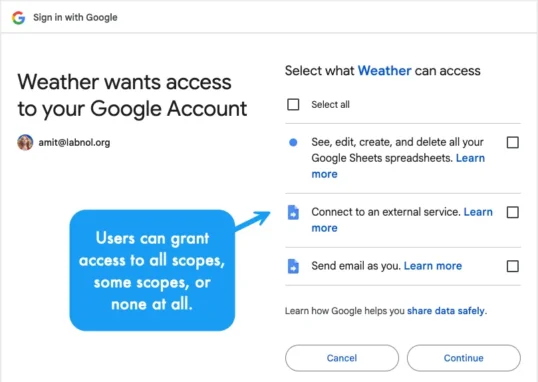
How to Handle OAuth Permissions in Google Add-ons
- 0
- 714 words
Table of Contents 1. How to Check for Required OAuth Scopes 1.1 The “Authorization Catch-22” Problem 1.2 How to Reset the Permissions...
Read out all
How to Recover Permanently Deleted Files and Folders in Google Drive
- 0
- 326 words
Table of Contents When you delete any file or folder in your Google Drive, it is moved to the trash folder. The...
Read out all
Simple URL Tricks for Google Drive You Should Know
- 0
- 374 words
Table of Contents 1. Google Drive URL Tricks 1.1 Google Drive Web Viewer 1.2 Reader Mode for Google Drive Files 1.3 Embed...
Read out all
How to Extract URLs from HYPERLINK Function in Google Sheets
- 0
- 201 words
The HYPERLINK formula of Google Sheets lets you insert hyperlinks into your spreadsheets. The function takes two arguments: The full URL of...
Read out all
Find and Remove Inactive Users in your Google Workspace Domain
- 0
- 388 words
Table of Contents 1. Find the inactive users in Google Workspace domain You can use Google Apps Script to find all the...
Read out all