This Google Spreadsheet on Udemy courses has about 50 sheets, one for each programming language, and the sheets are sorted in random order so it is difficult to find a specific sheet.
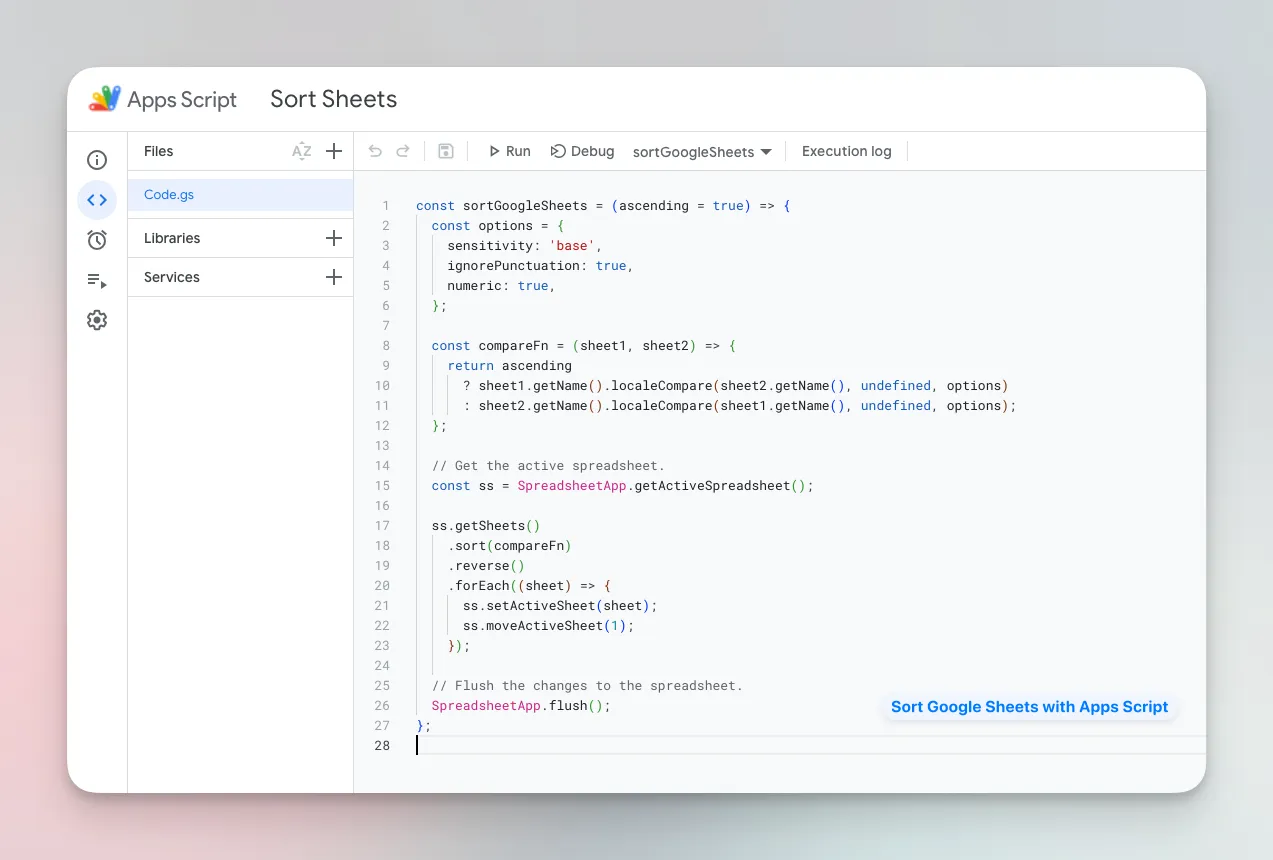
It will take a while to sort the worksheets manually but we can easily automate the process with Google Apps Script and easily navigate through large spreadsheets.
Automate Sheet Sorting with Google Apps Script
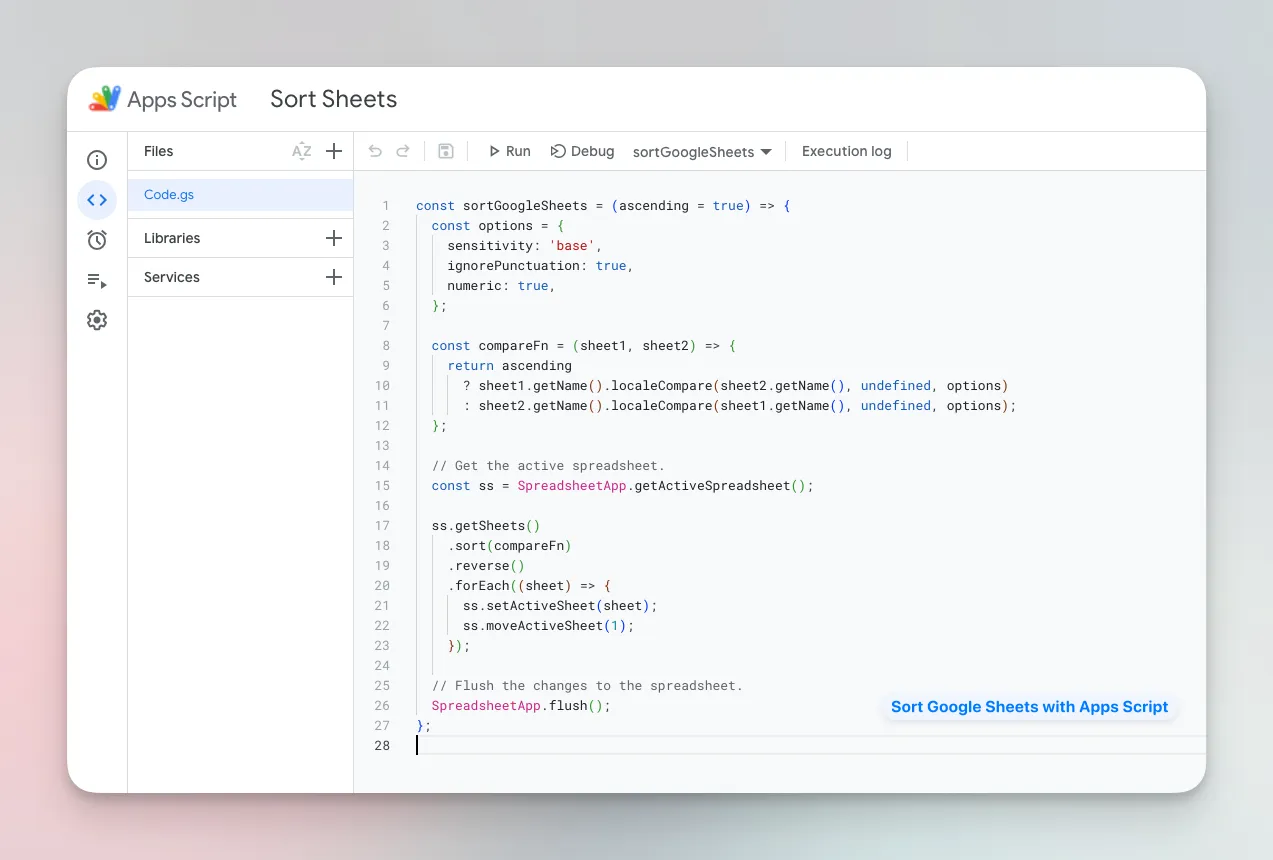
The following code snippet will automatically sort the worksheets in a Google Sheet alphanumerically. The script can arrange the sheets in either ascending or descending order based on the sheet names.
To get started, go to Extensions > Apps Script to open the script editor. Then, copy and paste the following code:
const sortGoogleSheets = (ascending = true) => {
  const options = {
    sensitivity: "base",
    ignorePunctuation: true,
    numeric: true,
  };

  const compareFn = (sheet1, sheet2) => {
    return ascending
      ? sheet1.getName().localeCompare(sheet2.getName(), undefined, options)
      : sheet2.getName().localeCompare(sheet1.getName(), undefined, options);
  };

  // Get the active spreadsheet.
  const ss = SpreadsheetApp.getActiveSpreadsheet();

  ss.getSheets()
    .sort(compareFn)
    .reverse()
    .forEach(sheet => {
      ss.setActiveSheet(sheet);
      ss.moveActiveSheet(1);
    });

  // Flush the changes to the spreadsheet.
  SpreadsheetApp.flush();
};
The compareFn function compares two sheets and returns a value that indicates whether the first sheet should come before or after the second sheet. The function returns the following values:
-1if the first sheet should come before the second sheet.1if the first sheet should come after the second sheet.
Advanced Sort Options
const options = {
  sensitivity: "base",
  ignorePunctuation: true,
  numeric: true,
};
The options object specifies the options for the locale comparison. Here are some important things to know:
-
The numeric property specifies whether numbers should be treated as numbers instead of strings. If this property is set to false, “Sheet1” and “Sheet10” will come before “Sheet2”.
-
The ignorePunctuation property specifies whether spaces, brackets and other punctuation should be ignored during the comparison. If this property is set to false, “Sheet 1” and “Sheet1” will be treated as different sheets.
-
The sensitivity property specifies if the comparison should be case-sensitive or case-insensitive. Set this property to “accent” to treat base letters and accented characters differently (Sheet a and Sheet à will be treated as different sheets).
Sort Google Sheets by Date
If your sheet names contain dates, like “March 2023” or “01/03/23”, you’ll need to convert the dates to numbers before comparing them.
const compareFn = (sheet1, sheet2) => {
  return ascending
    ? new Date(sheet1.getName()).getTime() - new Date(sheet2.getName()).getTime()
    : new Date(sheet2.getName()).getTime() - new Date(sheet1.getName()).getTime();
};
References
Author

prakhar@affmantra.com
Related Posts

How to Add Speech Recognition to your Website
Table of Contents 1. Add Voice Recognition to your Website Open the Google website on your desktop computer and you’ll find a...
Read out all
How to Handle OAuth Permissions in Google Add-ons
- 0
- 714 words
Table of Contents 1. How to Check for Required OAuth Scopes 1.1 The “Authorization Catch-22” Problem 1.2 How to Reset the Permissions...
Read out all
How to Recover Permanently Deleted Files and Folders in Google Drive
- 0
- 326 words
Table of Contents When you delete any file or folder in your Google Drive, it is moved to the trash folder. The...
Read out all
Simple URL Tricks for Google Drive You Should Know
- 0
- 374 words
Table of Contents 1. Google Drive URL Tricks 1.1 Google Drive Web Viewer 1.2 Reader Mode for Google Drive Files 1.3 Embed...
Read out all
How to Extract URLs from HYPERLINK Function in Google Sheets
- 0
- 201 words
The HYPERLINK formula of Google Sheets lets you insert hyperlinks into your spreadsheets. The function takes two arguments: The full URL of...
Read out all
Find and Remove Inactive Users in your Google Workspace Domain
- 0
- 388 words
Table of Contents 1. Find the inactive users in Google Workspace domain You can use Google Apps Script to find all the...
Read out all