Whether you are looking to learn a programming language, enhance your Microsoft Excel skills, or acquire knowledge in Machine Learning, Udemy probably has a video course for you. Udemy courses are usually affordable, there are no subscription fee and you can learn at your own pace.
Free Udemy Courses on Programming
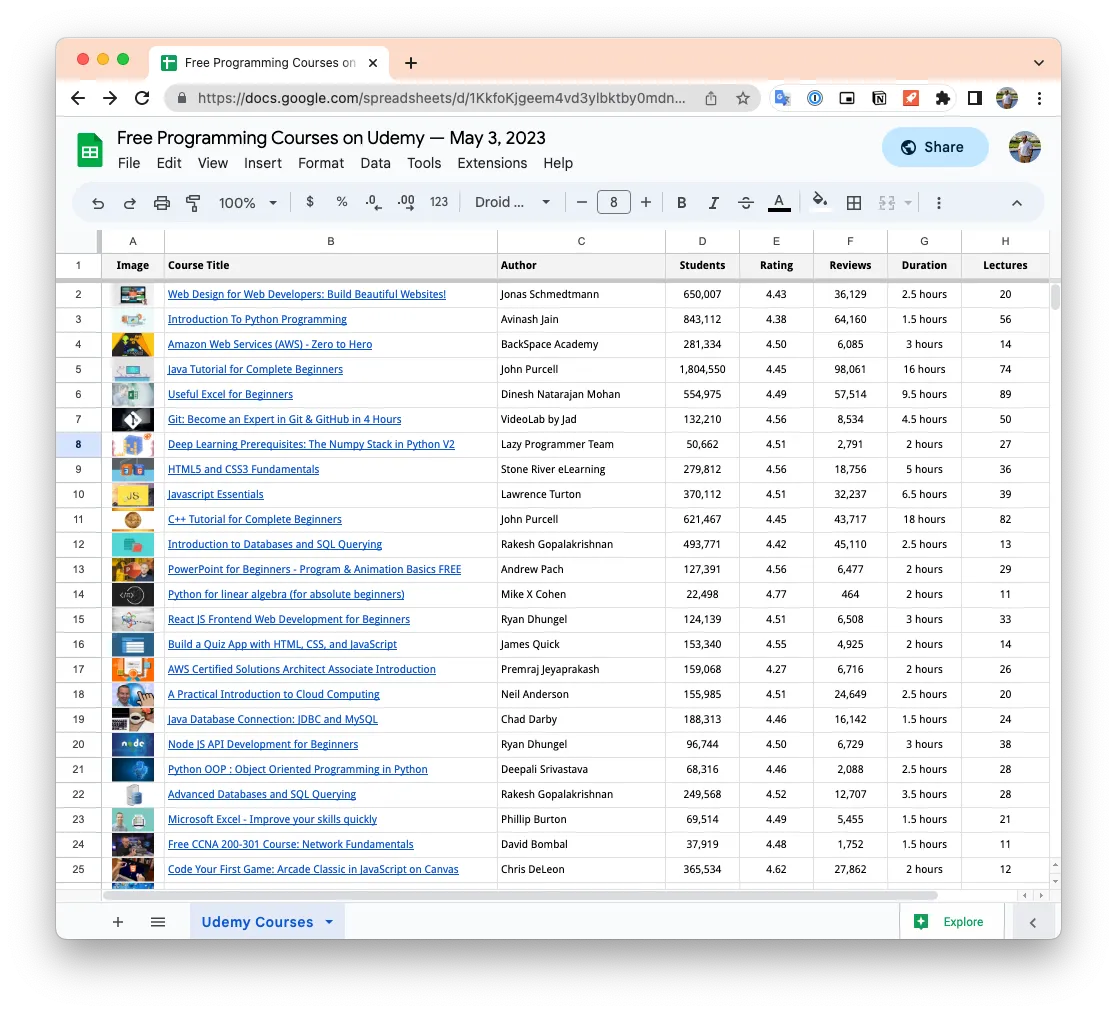
While most video tutorials on Udemy require payment, the website also offers some of their highly-rated courses for free. I’ve prepared a Google Sheet that lists all the free programming courses currently available on Udemy. The spreadsheet is updated automatically every few hours. You can also access the web version for easy browsing.
✨ You may use the search function of the browser (Ctrl + F) to find courses for a specific programming language or topic. The courses are sorted by popularity.
There’s no secret sauce. Udemy has an developer API that provides access to all the course data available on the website, including user ratings, number of students who have taken the course, duration, preview video lectures, and more.
Use the Udemy API with Google Sheets
The Udemy API is free to use but requires authentication. You can generate the credentials for your Udemy account and then use the /courses endpoint to fetch the list of free courses.
const parseCourseData_ = (courses) =>
  courses
    .filter(
      ({ is_paid, primary_category }) =>
        is_paid === false && ['Development', 'IT & Software'].includes(primary_category.title)
      // We are primarily interested in programming courses on Udemy
    )
    .map((e) => [
      `=IMAGE("${e.image_240x135}")`,
      `=HYPERLINK("https://www.udemy.com${e.url}";"${e.title}")`,
      e.visible_instructors.map(({ display_name }) => display_name).join(', '),
      e.num_subscribers,
      Math.round(e.avg_rating * 100) / 100,
      e.num_reviews,
      e.content_info_short,
      e.num_lectures,
      new Date(e.last_update_date)
    ]);

const listUdemyCoursesGoneFree = () => {
  // Put your Udemy credentials here
  const CLIENT_ID = '';
  const CLIENT_SECRET = '';

  const params = {
    page: 1,
    page_size: 100,
    is_paid: false,
    'fields[course]': '@all'
  };

  const query = Object.entries(params)
    .map(([key, value]) => `${key}=${encodeURIComponent(value)}`)
    .join('&');

  const apiUrl = `https://www.udemy.com/api-2.0/courses/?${query}`;
  const bearer = Utilities.base64Encode(`${CLIENT_ID}:${CLIENT_SECRET}`);
  const options = {
    muteHttpExceptions: true,
    headers: {
      Authorization: `Basic ${bearer}`
    }
  };

  const courses = [];

  do {
    const response = UrlFetchApp.fetch(apiUrl, options);
    const { results = [], next } = JSON.parse(response);
    courses.push(...parseCourseData_(results));
    url = next;
  } while (url && courses.length < 500);

  const ss = SpreadsheetApp.getActiveSpreadsheet();
  const [sheet] = ss.getSheets();
  sheet.getRange(2, 1, sheet.getLastRow(), sheet.getLastColumn()).clearContent();
  sheet.getRange(2, 1, courses.length, courses[0].length).setValues(courses);
};
We use the UrlFetch service of Google Scripts to fetch the data from the Udemy API and the data is then parsed and inserted into the Google Sheet. The course thumbnail image is rendered using the IMAGE formula and the course title is linked to the Udemy website using the HYPERLINK formula.
Related reading:
Author

prakhar@affmantra.com
Related Posts

How to Add Speech Recognition to your Website
Table of Contents 1. Add Voice Recognition to your Website Open the Google website on your desktop computer and you’ll find a...
Read out all
How to Handle OAuth Permissions in Google Add-ons
- 0
- 714 words
Table of Contents 1. How to Check for Required OAuth Scopes 1.1 The “Authorization Catch-22” Problem 1.2 How to Reset the Permissions...
Read out all
How to Recover Permanently Deleted Files and Folders in Google Drive
- 0
- 326 words
Table of Contents When you delete any file or folder in your Google Drive, it is moved to the trash folder. The...
Read out all
Simple URL Tricks for Google Drive You Should Know
- 0
- 374 words
Table of Contents 1. Google Drive URL Tricks 1.1 Google Drive Web Viewer 1.2 Reader Mode for Google Drive Files 1.3 Embed...
Read out all
How to Extract URLs from HYPERLINK Function in Google Sheets
- 0
- 201 words
The HYPERLINK formula of Google Sheets lets you insert hyperlinks into your spreadsheets. The function takes two arguments: The full URL of...
Read out all
Find and Remove Inactive Users in your Google Workspace Domain
- 0
- 388 words
Table of Contents 1. Find the inactive users in Google Workspace domain You can use Google Apps Script to find all the...
Read out all