From call screening to spam management, Pixel Weather and Recorder, the very nice camera, Now Playing, and many others, there’s just something comforting about the Pixel experience for me because I’ve been using Google’s phones since the Pixel 2 XL launched in 2017.
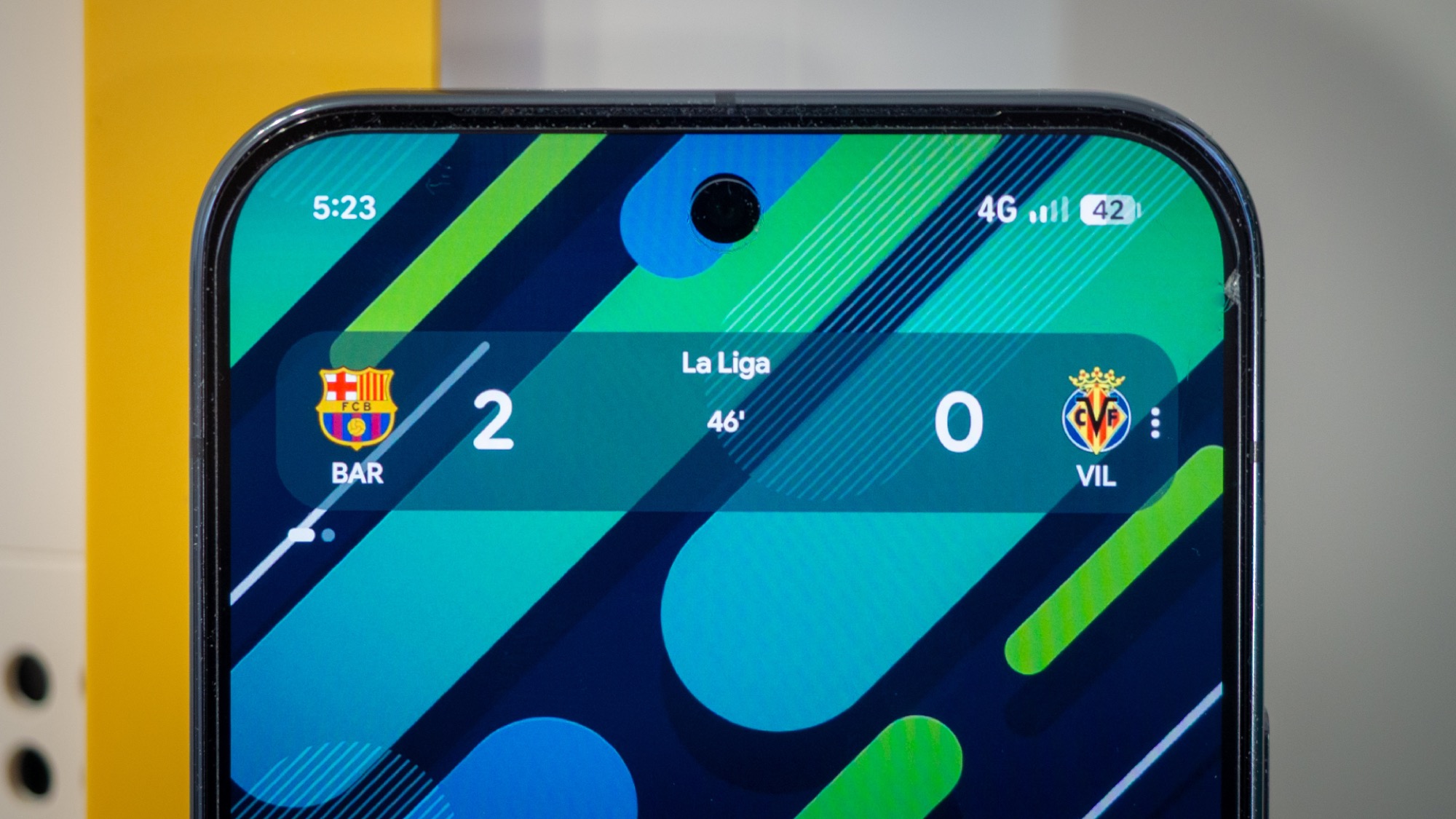
It’s not easy for me to pick a favorite Pixel feature, but one small addition keeps surprising me with how useful it is in various circumstances throughout my day: At A Glance. And just a few days ago, this widget that everyone seems to hate but that keeps me tied to Pixel Launcher just added one more feature I’ve been waiting for: sports scores.
Do you use Google’s At A Glance widget?
5 votes
Sport scores on my homescreen, only when they’re relevant

Rita El Khoury / Android Authority
I follow a lot of football teams, including Real Madrid, FC Barcelona, some Premier League teams, and a few international men’s and women’s squads. All of these appear on my Google Discover feed when I swipe from the left on my home screen, but I have to be aware that there’s a game to begin with, then remember when it’s happening, and then swipe to check the scores on time. The Google app offers a pinned floating score option, too, but bubbles and floating windows were never my favorite way of interacting with my phone. Also, the bubble didn’t always appear, or it disappeared for no reason, so it wasn’t very reliable.
The result was that I was often unaware that a game had started, what the score was, or what was happening until many hours later. I could’ve used notifications or home screen widgets to mitigate this, but those go against the way I’ve set up my phone with minimal visual and auditory distractions. Besides, I dislike widgets that stay on my screen at all times, even when there’s nothing going on.
At A Glance just solved this for me. Google has been working on sports scores for its widget for months, and it finally rolled it out. I saw it for the first time over the weekend, one hour before FC Barcelona’s Saturday afternoon game started. I was out with my husband, who’s a fan; we hadn’t checked the day’s schedule and assumed the game would be later on in the evening. But At A Glance popped up telling me it was starting a 4:15 PM.
We followed the score for the next couple of hours, my husband cheered for Yamal’s hat-trick while the Madrid fan in me grumbled, and come evening time, as we were choosing what to watch on TV, At A Glance told me the Klassiker was on in the Bundesliga, while Man City was playing a less interesting game in England. An easy choice. The next day, I woke up, looked at my phone, and learned that the USWNT had won a game in the SheBelieves Cup.
This is the kind of info I used to have to dig for in various apps and screens on my phone, but that is now all bundled into one neat, easily accessible, and very visible place.
What I also really appreciate about this sports score experience on my Pixel home screen is that it doesn’t require a special, permanent widget placement. It’s not unnecessary visual noise. It shows up as a standalone, swipable panel in At A Glance an hour before a match starts and remains until after the game (or until I check my phone at least once). Plus, it appears on my lock screen, too, and my always-on display. When I was out during Barca’s game, I didn’t even have to unlock my phone to see where things were at.
And if you don’t want it, there’s always a way to disable it or to momentarily swipe to see all the other At A Glance panels to check the weather or any other events, for example.
In my book, contextual data that surfaces when it’s relevant and disappears when it’s not needed will always be a superior user experience — provided my phone truly understands the context. And it seems that At A Glance has done that for sports scores, just like it has for flights, the flashlight, timers, and more. Now, if only it could be more reliable for “time to leave,” how happy I’d be!
Don’t want to miss the best from Android Authority?


Thank you for being part of our community. Read our Comment Policy before posting.
Author

prakhar@affmantra.com
Related Posts
These 5 Android apps are so good, I’m surprised they’re free
Joe Maring / Android Authority I’ve built a collection of such apps over the years. They’re all free, don’t show any ads,...
Read out all
Samsung Messages shutdown is limited to the US market for now
- 0
- 308 words
Joe Maring / Android Authority TL;DR Samsung Messages is reaching end-of-service in July 2026. The company has now clarified that the shutdown...
Read out all
The Galaxy Buds 4 fix two of my biggest problems
- 0
- 634 words
The Galaxy Buds 3 Pro are my favorite earbuds, and they’re so good that I wasn’t expecting many upgrades for the Galaxy...
Read out all
I tried to give smartwatches a second chance, but it didn’t go well
- 0
- 1,444 word
Kaitlyn Cimino / Android Authority For most of my life, I’ve been the kind of tech geek who gets excited about the...
Read out all
How to fix one of Android Auto’s most annoying display problems
- 0
- 751 words
Andy Walker / Android Authority I rely on Android’s Extra Dim accessibility feature almost every night. Introduced in Android 12, it allows...
Read out all
Need a power station? These two Anker ones are nearly half off
- 0
- 448 words
These deals are available from Amazon. Both are shipped and sold by Anker, though. Anker SOLIX C1000 Gen 2 There are plenty...
Read out all