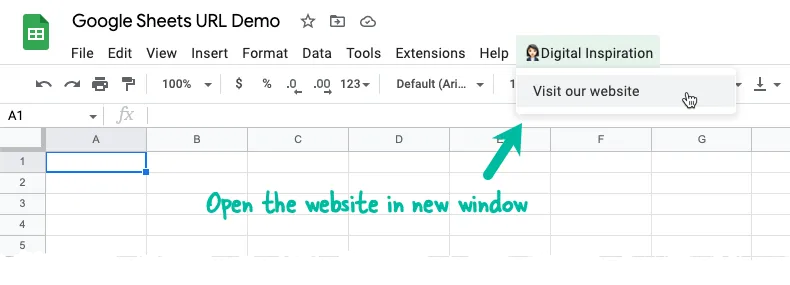
Let’s say you have built an add-on for Google Sheets that adds a new menu item to the sheets UI. You would now like to add an option in the menu that, when clicked, will redirect the user to your website without the user having to click any other button.
For instance, in this demo Google Sheet, we have a parent menu and a sub-menu that opens the underlying website in the new window.
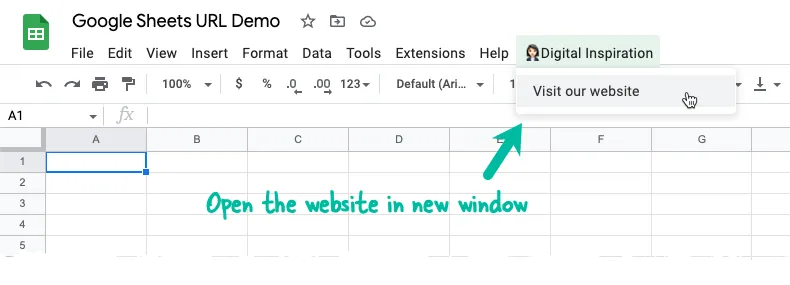
As a first step, we’ll add a custom menu in the Google Sheet and invoke it from the onOpen function so the menu is always available when a user opens your Google Sheet.
const onOpen = () => {
const ui = SpreadsheetApp.getUi();
const parentMenu = ui.createMenu('👩🏻💼 Digital Inspiration');
parentMenu.addItem('Visit our website', 'openWebsite');
parentMenu.addToUi();
};2. Add HTML for Website Redirection
Create a new file url.html in the Apps Script editor and add the following code.
The JavaScript uses the window.open method to open the URL in a new window since we have set the target to _blank.
<!DOCTYPE html>
<html>
  <body>
    <a href="<?= url; ?>" target="_blank">Click here</a> to open the webpage.
  </body>
  <script>
    var windowReference = window.open('<?= url; ?>', '_blank');
    if (windowReference !== null) {
      google.script.host.close();
    }
  </script>
</html>
If you would like to open the website in a fixed size popup, instead of a new window, the function would be written as:
<script>
  var windowFeatures = 'popup';
  var windowReference = window.open('<?= url; ?>', 'scriptWindow', windowFeatures);
  if (windowReference !== null) {
    google.script.host.close();
  }
</script>
The return value of the window.open method will be null if the window has been blocked by the browser’s built-in popup blockers.
The popup can be positioned anywhere on the script and resized to a specific height and width by modifying the windowFeatures variable as below:
// before
var windowFeatures = 'popup';

// after
var windowFeatures = 'left=100,top=100,width=320,height=320';
Please see the MDN docs for best practices around solving a few usability problems related to links opening secondary window.
3. Open link from Google Sheets
Next, we’ll write the Apps Script function that will be invoked from the menu and launch the website in a new window / tab.
const openWebsite = () => {
  const htmlTemplate = HtmlService.createTemplateFromFile('url.html');
  htmlTemplate.url = 'https://digitalinspiration.com/';
  const htmlOutput = htmlTemplate.evaluate().setHeight(50).setWidth(200);
  const ui = SpreadsheetApp.getUi();
  ui.showModelessDialog(htmlOutput, 'Open Website');
  Utilities.sleep(2000);
};
It is necessary to add the sleep function as opening the window may take a second or two. If sleep is omitted, the Spreadsheet dialog will open and instantly close without launching the website.
Author

prakhar@affmantra.com
Related Posts

How to Add Speech Recognition to your Website
Table of Contents 1. Add Voice Recognition to your Website Open the Google website on your desktop computer and you’ll find a...
Read out all
How to Handle OAuth Permissions in Google Add-ons
- 0
- 714 words
Table of Contents 1. How to Check for Required OAuth Scopes 1.1 The “Authorization Catch-22” Problem 1.2 How to Reset the Permissions...
Read out all
How to Recover Permanently Deleted Files and Folders in Google Drive
- 0
- 326 words
Table of Contents When you delete any file or folder in your Google Drive, it is moved to the trash folder. The...
Read out all
Simple URL Tricks for Google Drive You Should Know
- 0
- 374 words
Table of Contents 1. Google Drive URL Tricks 1.1 Google Drive Web Viewer 1.2 Reader Mode for Google Drive Files 1.3 Embed...
Read out all
How to Extract URLs from HYPERLINK Function in Google Sheets
- 0
- 201 words
The HYPERLINK formula of Google Sheets lets you insert hyperlinks into your spreadsheets. The function takes two arguments: The full URL of...
Read out all
Find and Remove Inactive Users in your Google Workspace Domain
- 0
- 388 words
Table of Contents 1. Find the inactive users in Google Workspace domain You can use Google Apps Script to find all the...
Read out all