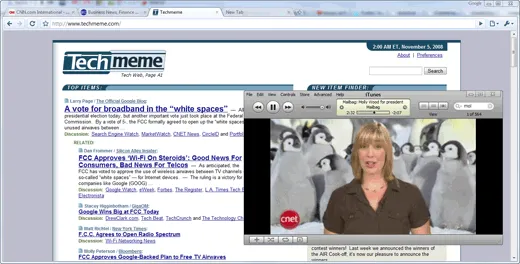
You are checking your emails in Google Chrome and simultaneously watching a YouTube video in VLC on your laptop. The problem is that if you switch to Gmail in the brower, the media player window moves to the background and vice-versa.
If you would like to prevent that video window from hiding even while you bring the browser to the foreground, you may download “Always on Top” – a free utility that will “stick” any program window to the foreground of your desktop with a simple keyboard shortcut. Some examples:
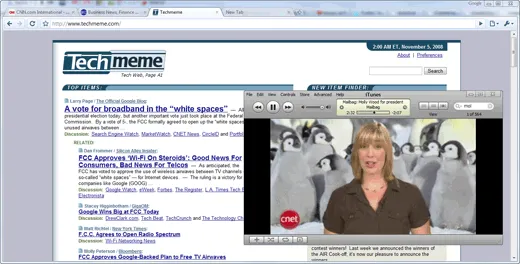
Browser running in the foreground but QuickTime is always visible
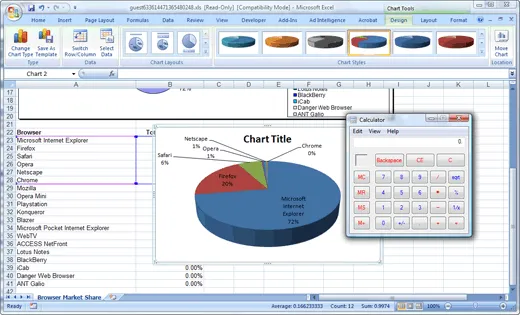
Keep the notepad or calculator handy while using an Excel Spreadsheet
To get started, download the Always On Top utility from labnol.org (~200k) and run it. Then select the window you like to keep on top and press the Ctrl+Space shortcut to stick that window in the front.
You no longer have to worry about arranging windows side-by-side to copy-paste information from one window to another. If you like to disable sticking and restore the default window behavior, just press the same Ctrl+Space shortcut again.
Source Code
The program is written in Autohotkey with a single line of code:
^SPACE:: Winset, Alwaysontop, , AVideo Demo – Always on Top Utility
Author

prakhar@affmantra.com
Related Posts

How to Add Speech Recognition to your Website
Table of Contents 1. Add Voice Recognition to your Website Open the Google website on your desktop computer and you’ll find a...
Read out all
How to Handle OAuth Permissions in Google Add-ons
- 0
- 714 words
Table of Contents 1. How to Check for Required OAuth Scopes 1.1 The “Authorization Catch-22” Problem 1.2 How to Reset the Permissions...
Read out all
How to Recover Permanently Deleted Files and Folders in Google Drive
- 0
- 326 words
Table of Contents When you delete any file or folder in your Google Drive, it is moved to the trash folder. The...
Read out all
Simple URL Tricks for Google Drive You Should Know
- 0
- 374 words
Table of Contents 1. Google Drive URL Tricks 1.1 Google Drive Web Viewer 1.2 Reader Mode for Google Drive Files 1.3 Embed...
Read out all
How to Extract URLs from HYPERLINK Function in Google Sheets
- 0
- 201 words
The HYPERLINK formula of Google Sheets lets you insert hyperlinks into your spreadsheets. The function takes two arguments: The full URL of...
Read out all
Find and Remove Inactive Users in your Google Workspace Domain
- 0
- 388 words
Table of Contents 1. Find the inactive users in Google Workspace domain You can use Google Apps Script to find all the...
Read out all